
Sm∆rtMeet Process Guidelines For Suppliers
If you’re reading this, your company has purchased meetings for Sm∆rtMeet by Money 20/20!
We’re providing these guidelines to help communicate the rules, tasks, deadlines, and how the Sm∆rtMeet process works. For any question re: Sm∆rtMeet process, you may contact your account manager or email meetingsales@informa.com.
Rules of the Game
- Your team will agree to be available for the 14 Sm∆rtMeet time slots during Money20/20 (see time slots below).
- Your team agrees to follow all timelines and recommendations for processes.
- Refunds/credits are calculated post-show and determined by if the algorithm was not able to schedule meetings for you or if buyers did not show up. If your team does not complete the profile or selections stage as advised, this may affect your refund. Any meeting that is a no-show by a supplier will not be entitled to a refund.
What and When
STEP 1: BUY YOUR MEETINGS
From now until August 13
On-time deadline to purchase meetings is August 13, 2026 to get into the platform with no delays!
STEP 2: REGISTER PARTICIPANTS & PROVIDE ANY MISSING INFO
August 25
Register meeting participants, log-in and activate your account and provide any requested information to our onboarding team.
Note: Your team will not be able to make selections or be seen by Buyer companies until you have activated your profiles and assigned badges.
STEP 3: SELECTIONS
September 2 - September 9
Review profiles and select whom you’d like to meet.
You must select at least 4x the amount of meetings you purchased (i.e. if you bought 10 meetings, your required selection is 40 unique buyer companies.)
You should select all those from a company that are interesting to you because you’re competing for time/attention versus other supplier companies. You will not get scheduled with two meetings with the same company, so to maximize your chances of meeting with any firm, you should choose as many from a company that are interesting; however, when we talk about 40 unique selections, that will be selections across 40 unique companies.
STEP 4: SCORE GENERATION
Scores are generated by mutual match and interest level ('meet' versus 'must meet'). Our algorithm then generates meetings based on score. Double opt-in meetings mean no meeting is generated that you didn’t select.
STEP 5: RECEIVE YOUR SM∆RTMEET SCHEDULED MEETINGS
September 18
Your team receives its schedule via email of meetings generated by score and priority. Double opt-in meetings mean no meeting is generated that you didn’t select. There should not be any adjustments to your schedule from here as your team has already blocked out the meeting times.
STEP 6: MEETINGS ONSITE
October 19 & 20
Your team sends 1 member for the 1:1 meetings onsite at Money20/20 USA, knowing you can focus on driving new connections with ease vs. hustling for your next handshake.
We’ll have assistance onsite for any questions!
STEP 7: RECONCILIATION
Within six weeks post-show
We’ll be compiling data and checking who attended. For any meetings that did not happen, we will try to reschedule. If we cannot, we will reach out within 4 weeks of the show for a credit or refund.
Task Timeline
| Tasks | Start Date | Deadline | Time Commitment |
|---|---|---|---|
| 1. Assign Meeting Participants & Submit any missing info | Monday, August 3 | Tuesday, August 25 | 15 min |
| 2. All Meeting Participants Make Buyer Selections | Wednesday, September 2 | Wednesday, September 9 at 11:59 pm ET | 60-120 min |
| 3. Receive meeting schedule via email | Friday, September 18 (by 8pm ET) | ||
| 4. Take Meetings Onsite | Monday, October 19 and Tuesday, October 20 |
Who?
Main Point of Contact for your company for Sm∆rtMeet:
We understand that who signs the contract is not always the main point of contact, so please let us know if someone else would be the better main POC for Sm∆rtMeet.
As the main POC, you will need to ensure that before the selection/preferences stage begins that your meeting participants are registered for Money20/20. If this is not done, your team will be delayed in being visible to Buyers and may limit your success in the program.
As the main point of contact, you’ll be letting us know who the main POC is and who the meeting participants are. Meeting participants must have a registered Money20/20 USA pass.
Who can log-in and make selections?
Meeting Participants are those who will be making selections and most likely taking the meetings. Although you can technically choose who will attend the meetings when you receive your schedule, your meeting participants are able to make preferences about who your company wants to meet with.
Can the person who is the main POC also be a meeting participant?
Yes, they can. You’ll just need to make sure to let us know and ensure that you are registered with a Money20/20 Badge.
If I’m the main POC, but I won’t be registering or going to Money20/20, how will I see the selections?
The selections phase is only visible to meeting participants' Money20/20 Connect account, so you should ensure that whomever your meeting participants are, that you’re communicating with them on any goals, etc. We will follow up if we see that they have not chosen enough unique companies or made enough selections and if it goes without action, we’ll contact the main POC as well.
How many meeting participants will we need?
It is better to have >1 meeting participant as it can help maximize the chances of filling up your schedule. We recommend that for every 7 meetings, you have 1 meeting participant (e.g. if your company bought 20 meetings, you'd have to have at least 2 meeting participants, but we’d recommend 3). Your company can have a maximum of 4 participants.
In order for your company to be loaded into the system, you must not only identify the meeting participants, but also register them for a badge. Please confirm with our team the email address of all meeting participants. Any late additions for meeting participants past Tuesday, August 25 should expect a delay in getting access.
Note: The algorithm will work to maximize meeting schedules and thus if you give us multiple meeting participants, you will likely have concurrent meetings and your team should plan for so. We cannot make schedule adjustments after the algorithm has run for non-concurrent meetings.
All-Star Tip
Because some of your team may register independently of each other, please make sure that they’re careful with spelling their own name and their company name correctly. How they register directly feeds into our meetings platform, so we want to mitigate any possible errors. We give this tip, because we’ve seen it happen!
Only Money20/20 registered attendees will be able to participate in Sm∆rtMeet by Money20/20 meetings. The sooner you can register and assign names for those you want to take Sm∆rtMeet meetings, the easier it will be for you and your team.
How do I let you know who from my team will attend the meeting?
Once you receive the schedule via email, we suggest you sit down with your whole team to go through who you want to attend each meeting. We also suggest that you save these in your whole team’s Outlook/Google Calendar to ensure you’re aligned. You don’t need to notify the Money20/20 team who is attending the meeting.
A reminder - Sm∆rtMeet meetings are 1:1, which means only 1 person can attend each meeting. If you bring more than 1 person to any one meeting, the extra participant will be asked to leave the hosted area. We understand sometimes you want a sales and a developer present at the meeting, but with only 15 minutes, this is the perfect amount of time to understand the Buyer, their needs, and to continue the conversation after within the Festival Hall.
Designated Meeting Times
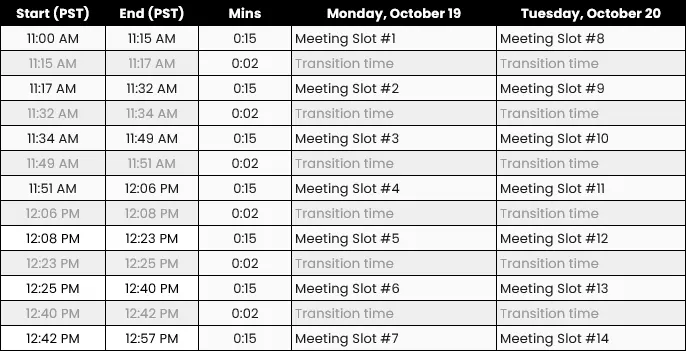
These are the designated meeting times.
Please note: Because of the way our algorithm works, meeting participants must be available for all the time slots when we’re scheduling. Once you receive the schedule on September 18, the only changes we would be making is if the Buyers’ availability changes.
Location of the Meetings
The meetings will be in the Venetian Ballroom (HIJ), but will be accessible by walking within the Money Hall at the Venetian Convention Center. This is located near the Exchange Stage.
Selections
After we send the email on Wednesday, September 2 that the Selections process has begun, your meeting participants will be able to log-in to their Money20/20 account and make selections. They will be able to sort and also look through lists where our Buyers are separated by Retailers and Certified Financial Institutions.
Participants must simply choose “Must Meet” or "Meet” to indicate your preference. You can sort through some of our premade lists, or recommendations, or search by company. Your selections will be pooled as a company, so it works in your advantage to make as many selections as possible. You will not get more than 1 meeting with a person from the same company, so your team should choose everyone they are interested in meeting with. If there is someone you’re more interested in meeting with, then please mark “Must Meet” as the algorithm will work harder to schedule meetings where both buyer and suppliers mark “Must Meet."
Your team must make 4x’s the amount of unique selections that your company purchased. The more selections you make the higher chance you can fill up your company’s schedule.
There will be no additional opportunities to make selections once our selection phases close on Wednesday, September 9.
Helpful Tips about the Selections Process:
Remember, this is a team sport to fill up your schedule. Your meeting participants selections are pooled together, so the more the merrier. The more selections your team makes, the higher the likelihood your company will be able to fill their schedule. You’re competing for buyers’ attention versus other solution partners, so it’s very important that suppliers meet their minimum selection count. Using our prioritization buttons “Must Meet” and “Meet” will help you as the algorithm will first schedule meetings with mutual matches that are both ‘must meet.'
You’ll be able to choose who from your team takes the meetings later! Don’t worry about whose selection is yours or a teammates. We will maximize your teams’ likelihood for meetings and after you receive your meeting schedule on September 18, you’ll be able to decide who from your team is best to take the meeting.
No awkward meetings: remember, no meetings can be scheduled unless both a buyer and supplier are interested, and this is why the first most crucial step is increasing the probability of meetings, doing this by choosing the largest amount of selections and remembering to mark highest priority for your team. If there are multiple buyers from the same company, it is better to select all of them, than one.