
Sm∆rtMeet Buyer Process & Guidelines
WATCH NOW
Quick Guide: What to Expect as a Hosted Buyer
If you’re an approved buyer at Sm∆rtMeet by Money20/20 you:
- Agree to participate in up to (5) or (10) 15-minute meetings.
- Have checked out in Pass Manager and now have a Registered Buyer badge for Money20/20 USA 2026.
- Confirmed that you are currently employed and that the information provided about your role and company is accurate. As part of your responsibilities, you’re involved in learning about, evaluating, purchasing, or implementing new technologies.
- Understand that your participation is subject to Money20/20’s Terms and Conditions for Event Attendance and Sm∆rtMeet by Money20/20 meetings program.
- Confirm that if you don’t fulfill your meeting obligation for any reason that you will be charged the full price of the Delegate Pass onto your method of payment on immediate payment terms.
What Sm∆rtMeet by Money20/20 will deliver to you:
- Up to 10 double opt-in meetings with participating suppliers and solution partners.
- If you are approved for 5 meetings, you will receive 50% off your ticket price. If you are approved for 10 meetings, you will receive a full complimentary pass to the show. Both tickets will give you not only access to the meetings but all content, activations, and networking that Money20/20 has to offer. Our team will be happy to make any suggestions for your time at Money20/20.
- Meetings are 15 minutes long and are double opt-in.
As a Buyer, you will:
- Complete an application, subject to approval, and register online subject to our T&C's
- Opt-in to our Terms and Conditions of Sm∆rtMeet
- Complete all pre-show fulfillment tasks (listed below, please read carefully)
- Show up to all scheduled meetings onsite
- Fill out feedback on the meetings
Rules of the Game:
- You will agree to be available for all of the 14 Sm∆rtMeet time slots during Money20/20 USA
- Acceptance into the program is contingent upon current role and company. If your role or company changes, you must let us know immediately.
- If you do not complete the profile or selections stage on-time, your participation may be limited within the program or subject to our selection.
- If you are unable to participate last minute, replacement can potentially be accepted prior to selection phrase but subject to buyer team approval. Please notify buyer.meeting@informa.com once you know that you can’t attend.
- If you pick up your badge onsite or otherwise attend the show but do not complete your scheduled Sm∆rtMeet meetings, we will invoice you for the full price ticket.
Task Timeline
| Task | Start Date | Deadline | Time Commitment |
|---|---|---|---|
| 1. Log-in to your Account & Make Supplier Selections | Wednesday, September 2 | Wednesday, September 9 at 11:59pm ET | <45 min |
| 2. Reply to any bespoke emails/inquiries | Thursday, September 10 | Thursday, September 17 | <15 min |
| 3. Receive meeting schedule via email | Friday, September 18 | <5 min | |
| 4. App Opens to all attendees | Week of September 21 | ||
| 5. Let us know if you want any meetings with peers/colleagues | Monday, September 21 | Wednesday, October 14 | <5 min |
| 6. Receive Final Sm∆rtMeet Schedule via email and visible in app | Tuesday, October 13 | ||
| 7. Take Meetings Onsite | October 19 & 20 | ||
| 8. Give Feedback | Week of October 26 | <15 min |
Activate & Log-in into your Account
Once the portal goes live for selections on Wednesday, September 2, you’ll receive an email. Please log in using your Money20/20 website account details. The account must match the email address that has been used against your pass in order to gain access.
Make your Selections
It’s easy and you can search through premade lists and filters. Simply choose “Must Meet” or "Meet” to indicate your preference.
You can sort through some of our premade lists, or recommendations, or search by company. You need to make 4x’s the amount of selections for the meetings you’re committed to (e.g. if you committed to 5 meetings, you should make no less than 20 selections and if you committed to 10, you should make at least 40). If you need help or suggestions on your selections, please contact our team.
Note: for any Buyers that come in past the September 2 deadline or do not make enough selections, we may make selections for you based on your company and role. You would still be required to attend any meetings you do not make selections for.
Designated Meeting Times
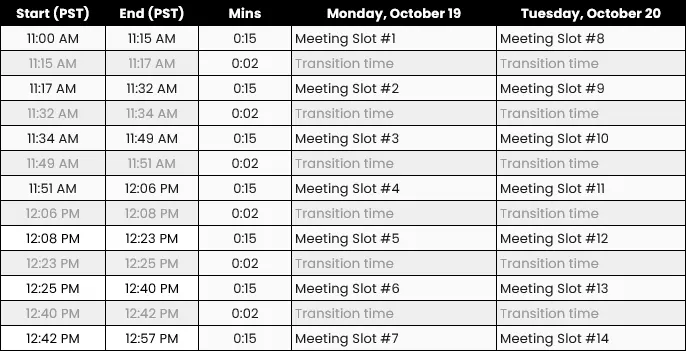
Location of the Meetings
The meetings will be in the Venetian Ballroom (HIJ), but will be accessible by walking within the Money Hall at the Venetian Convention Center. This is located near the Exchange Stage.
FAQs
How do meetings get scheduled for Sm∆rtMeet by Money20/20?
Our meetings are double opt-in, meaning both a Buyer and a Supplier have to show interest within the platform (no awkward first dates). After the selection process is complete, our AI-powered algorithm identifies and scores all mutual matches. The algorithm looks at all scores and selections across all meeting participants to maximize meetings and prioritizes scheduling those with higher interest first (i.e. higher interested mutual matches (must meet) are more likely to become meetings than those just marked as ‘meet’). This means, it only works in your benefit to really note “Must Meet” versus “Meet” in the platform.
Why do I have to make at least 4x’s the amount of selections of my meeting requirement?
All participants are competing for time and attention versus each other. Because our meetings are double opt-in, we need to ensure that Buyers are going through the lists and filtering, examining different products. If you have any questions or need help in making your selections, please email buyer.meetings@informa.com.
What are the other ways to network at Money20/20?
After you receive your meeting schedule by Friday, September 18, we may still adjust your schedule slightly if you’re still under your recommended amount of meetings; however, once the Money20/20 Connect networking app fully opens, you will be able to make outbound meeting requests or respond to inbound requests with those you want to meet with (this is called FreeFlow meetings). We know buyers receive a lot of meeting requests during this FreeFlow period, so our team will reach out to you to see if we can help manage your queue and interest - whether helping you schedule some meetings or responding to inbound requests.
Additionally, there are activations, meetups, content sessions, podcast recordings, sponsored events, and other great ways to network at Money20/20. You'll want to check the Agenda once it is released and as always, reach out to buyer.meetings@informa.com if you need any recommendations.
I have a colleague that is attending Money20/20 - can they take my meetings for me?
When we are in the preferences/selections stage, suppliers are examining the list closely and choosing buyers on an individual basis. Sm∆rtMeet is a double opt-in program, so suppliers are selecting you based on criteria. There should be no switching or substitutions between meeting participants. If there's an individual case or last minute request, please contact buyer.meetings@informa.com to see if we can assist.
What if I’m busy at the time of my Sm∆rtMeet meetings? / Can I choose to be available at specific time slots?
As part of being a Buyer, you have agreed to be available for all 14 meeting slots until the meeting schedule is sent on September 18. However, if on September 18, your scheduled meetings total is less than your committed meetings (i.e. we scheduled you for 3 meetings and you committed to 5), then we may still add Sm∆rtMeet meetings to your calendar until one week to the show. We will confirm with you your final schedule, so at that point, feel free to fill up your calendar. All Sm∆rtMeet meeting participants (both Buyers and Suppliers) are on a shared timeline, so there should be very limited changes from September 18 to onsite.
If there is a last minute change, you may contact us, but if the meeting cannot be rescheduled, this may affect you and your company’s overall participation.
I only received a list of 6 meetings, but I committed to 10 meetings?
When we send your meetings on September 18, we will let you know that you’re currently below your meeting requirement. We will also let you know that the schedule above is unlikely to change. We reserve the right to add on additional meetings until October 9, so that you have the full slate of meetings to fulfill your requirement. If you receive no further additions up to October 9 and your final meeting schedule still has fewer meetings scheduled than originally agreed upon, you will not be penalized, but please remember, you must attend all meetings that were scheduled to not risk being invoiced for your ticket.
What if suppliers did not attend the meetings?
We have staff members on-site to record the attendance for each time slot. If a supplier does not show up, please inform the on-site staff. We ask you to stay until at least the 7:00 mark (7 minutes left in your 15-minute slot) in case the supplier is just running late. We will make an effort to reschedule the meetings for you after the event if the supplier indeed did not show up. Rest assured, if the no-show is due to the supplier, it will not affect your meetings fulfillment rate, and you will not be penalized.
Can I still participate in Sm∆rtMeet if I have purchased a pass already?
You are welcome to apply to become a Sm∆rtmeet buyer by contacting buyer.meetings@informa.com. Our team will review your profile and determine your eligibility. If your application is approved, you will have the option to either receive a refund for the difference in cost with the buyer pass or apply the credit toward a 2027 pass. Please note that refunds will only be processed after the show, once we have verified that all scheduled meetings were attended. The refunds will arrive in your account that you originally made the payment with within 30 days after we release the funds.
What happens if I don’t attend my scheduled meetings?
While we hope that’s not the case as we all have agreed to participate and have been careful to understand the requirements, if a Buyer does not attend their scheduled meetings and fulfill the obligations of a Buyer, their badge will be invoiced to their company and risk their company’s potential future participation as a Buyer in Sm∆rtMeet.
I have a last minute emergency and can no longer attend, but have a colleague available. Can they attend in my place?
We can offer replacements prior to selection phrase. Please notify buyer.meetings@informa.com and we can see if we can find a solution.